
⬅️ Tip: Use your browser’s back arrow to return to the previous page anytime.
Temperature
Solve Hard-to-Troubleshoot Temperature Related Problems
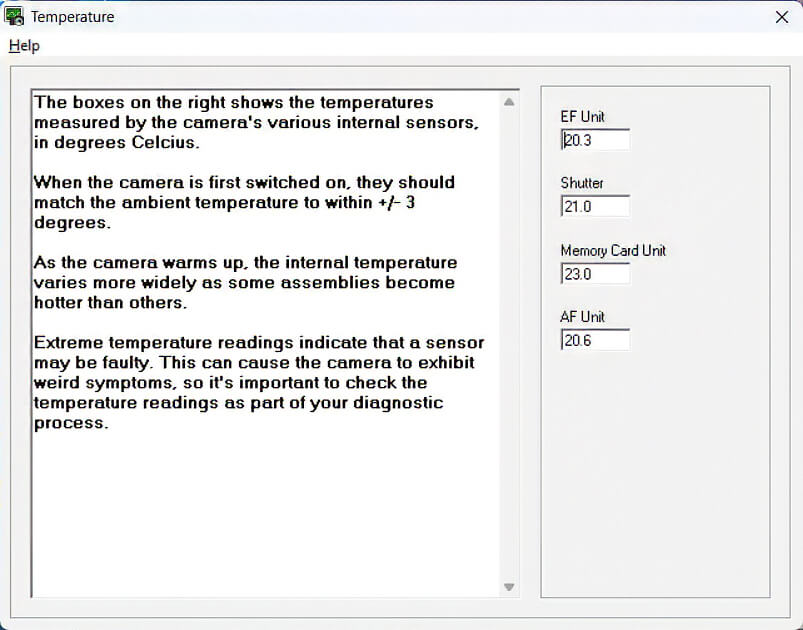
With the Temperature Plugin, you can:
- Check and Test Key Sensors; on the EF Unit, Shutter, Memory Card Unit, and AF Unit.
- Eliminate guesswork when diagnosing temperature sensor issues.
- Quickly identify the source of temperature-related problems.
- Save time and minimize frustration during repairs.
Here are a few temperature-related issues
- Soft focus on hot days – Caused by changes in Lens Flange/CMOS distance.
- Random overexposure or underexposure – Due to fluctuations in AE current.
- Dark images at high shutter speeds – Resulting from Shutter temperature changes.
- Flash malfunctions – Triggered by temperature shifts in the EF unit.
Troubleshooting Example
| Tools |
Troubleshooting |
|
Temperature Plugin
|
Temperature Plugin: Shows real-time sensor readings against normal room temperature (23°C):
|
|
Error Code Tab
|
Error History Tab: Displays Error 351 — Possible cause: Faulty CMOS Sensor Unit. |
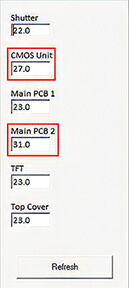
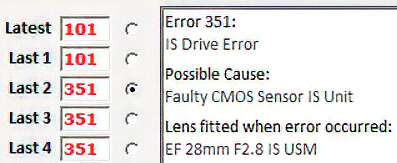
The live data pinpoints the thermal failure immediately, confirming the cause of the Error 351 shutdown.
⬅️ Done? Use your browser’s back arrow to return.