News

Welcome to our Technical Information Pages!

The Defaults and Geographical Plugin

in the Canon R5 MK2 Professional Advanced Software

⬅️ Tip: Use your browser’s back arrow to return to the previous page anytime.
Click this tab bar to view each feature of the plugin
Standard Defaults
Restore Factory Defaults, Avoid Calibration Conflicts, Prep the Camera for Resale

With Standard Defaults, you can:

  • Reset some or all settings back to Factory Defaults.
  • Eliminate Calibration conflicts by resetting User or Custom Functions to Factory Defaults.
  • Reset the camera’s language back to English if it defaults into Japanese.
  • Reset Factory Defaults for Resale, which also removes the Previous Owner’s Settings.

⚠️ Before resetting User and Custom functions to Factory Default, be sure to back up the customer’s setting using the User Tab in Essential.

Buy Main Boards Internationally - Shop for the Best Price and Availability!
Regional Defaults

With Regional Defaults, you can:

  • Buy Main Boards globally without worrying about region-specific settings.
  • Quickly adjust your camera to match the correct settings for your country.

Regional Settings Include:

  • Video System (PAL/NTSC)
  • WiFi Configuration
  • User Language
  • Date Format

To to set Geographical Defaults enter the DS Model Number found the bottom of the camera. ⚠️ For this model, a new camera password may need be set before you can make further adjustments.

⚠️ On this model, resetting the Region WILL RESET ALL USER SETTING. Back up the customer’s settings using the User Tab in Essential

⬅️ Done? Use your browser’s back arrow to return.


The Temperature Plugin

in the Canon R5 MKII Professional Advanced Software

⬅️ Tip: Use your browser’s back arrow to return to the previous page anytime.

Solve Hard-to-Troubleshoot Temperature Related Problems

With the Temperature Plugin, you can:

  1. Check and Test Key Sensors; on the Shutter, CMOS Unit and Main PCB.
  2. Eliminate guesswork when diagnosing temperature sensor issues.
  3. Quickly identify the source of temperature-related problems.
  4. Save time and minimize frustration during repairs.


Here are a few temperature-related issues

  • Soft focus on hot days – Caused by changes in Lens Flange/CMOS distance.
  • Random overexposure or underexposure – Due to fluctuations in AE current.
  • Dark images at high shutter speeds – Resulting from Shutter temperature changes.
  • Flash malfunctions – Triggered by temperature shifts in the EF unit.

Troubleshooting Example

Tools

Troubleshooting

Temperature Plugin

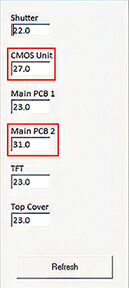
Temperature Plugin: Shows real-time sensor readings against normal room temperature (23°C):

  • Normal Benchmark: 23°C
  • CMOS Unit: 27°C (Elevated)
  • Main Board 2: 31°C (Overheating / Over-range)

Error Code Tab

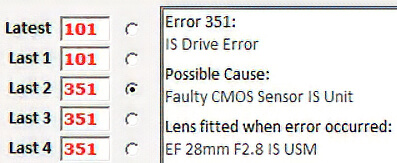
Error History Tab: Displays Error 351 — Possible cause: Faulty CMOS Sensor Unit.

The live data pinpoints the thermal failure immediately, confirming the cause of the Error 351 shutdown.

⬅️ Done? Use your browser’s back arrow to return.
 

Canon R5 MKII Shutter Calibration & Count Resets | SPT

⬅️ Tip: Use your browser’s back arrow to return to the previous page anytime.
 
Click this tab bar to view each feature of the plugin
Shutter Timing
Calibrate your shutter without expensive test equipment
Shutter Timing

Fine-tune high shutter speeds using histograms — no costly test gear required.

The software guides you step-by-step, saving time and effort.

⚠️ For accurate results, use a calibrated light source like a lightbox.

X Contact Timing
Check and adjust X Contact Timing if needed
X Contact Timing
Shutter Count
Reset the current Shutter Count to '0' after a shutter replacement
Shutter Count

View total Shutter Count and replacement history.
You can also reset the replacement history if needed.

Release Count
Change the Count number your customer sees in their Camera Menu
Release Count

Camera Menu &; Shutter Count Apps

The number shown in the Camera Menu and by Shutter-Count apps is the Total Release Count.

✅ YES — You can change the Total Release Count on this model.

⬅️ Done? Use your browser’s back arrow to return.
 

Advanced Camera FAX Reports

Include Data from you're Advanced Plugins

⬅️ Tip: Use your browser’s back arrow to return to the previous page anytime.


Advanced Camera FAX

Before and After Service Reports for your Customers

Promote your business with your custom Headers and Footers


New Feature: Integrated Manufacture Details

Our Camera FAX now includes a comprehensive Manufacture Details section. By analyzing the serial number, the software instantly identifies:

  • Production Data: Manufacturing Date, Factory, and Age.
  • Market Specifics: Destination Region and Quality Class.

Why this matters:

The Destination Region is a critical tool for any professional shop. It allows you to immediately identify "Grey Market" imports. Because these units often operate on Wi-Fi frequencies that are restricted or illegal in certain countries, providing this data protects both you and your customer from legal and compatibility issues.


Professional Reporting & Revenue Growth

  • Create New Income: Offer the Camera FAX as a fast, standalone diagnostic service to generate extra revenue.
  • Build Customer Trust: Provide professional "Before and After" reports to prove your work and justify your repair costs.
  • Verify Market Origin: Instantly identify "Grey Market" imports to avoid warranty issues and illegal Wi-Fi frequencies.
  • Faster Estimates: Quickly access shutter counts and internal error logs for more accurate and profitable repair quotes.

⬅️ Done? Use your browser’s back arrow to return.


Professional Camera FAX Reports

Canon Mirrorless Diagnostic Software

⬅️ Tip: Use your browser’s back arrow to return to the previous page anytime.


Professional Camera FAX

Before and After Service Reports for your Customers

Promote your business with your custom Headers and Footers


New Feature: Integrated Manufacture Details

Our Camera FAX now includes a comprehensive Manufacture Details section. By analyzing the serial number, the software instantly identifies:

  • Production Data: Manufacturing Date, Factory, and Age.
  • Market Specifics: Destination Region and Quality Class.

Why this matters:

The Destination Region is a critical tool for any professional shop. It allows you to immediately identify "Grey Market" imports. Because these units often operate on Wi-Fi frequencies that are restricted or illegal in certain countries, providing this data protects both you and your customer from legal and compatibility issues.


Professional Reporting & Revenue Growth

  • Create New Income: Offer the Camera FAX as a fast, standalone diagnostic service to generate extra revenue.
  • Build Customer Trust: Provide professional "Before and After" reports to prove your work and justify your repair costs.
  • Verify Market Origin: Instantly identify "Grey Market" imports to avoid warranty issues and illegal Wi-Fi frequencies.
  • Faster Estimates: Quickly access shutter counts and internal error logs for more accurate and profitable repair quotes.

⬅️ Done? Use your browser’s back arrow to return.